

Introduction
Audio-visual (AV) production is a critical component of modern corporate events. Conferences, seminars, product launches, annual meetings and leadership gatherings increasingly depend on sound reinforcement, presentation displays, stage lighting and integrated technical systems to communicate information effectively. Even a well-planned event can lose its impact when microphones fail, presentation screens become difficult to read or lighting interferes with visibility.
Corporate AV production involves much more than arranging speakers and installing screens. It requires an understanding of the venue, audience size, programme format, acoustics, electrical infrastructure, equipment compatibility and technical workflows. Each component must function as part of a coordinated system, with sufficient preparation to prevent disruptions during the event.
Ahmedabad’s corporate environment includes manufacturing companies, professional service firms, educational institutions, healthcare organisations and businesses conducting regional and national meetings. As companies organise increasingly structured events, the demand for dependable technical planning becomes an important consideration in event management.
A successful AV setup begins with the event’s communication objectives. The equipment, stage design, lighting arrangement and technical crew should support those objectives rather than introduce unnecessary complexity. Understanding these requirements helps businesses plan corporate events that are clear, engaging and operationally reliable.
Understanding Corporate AV Event Production
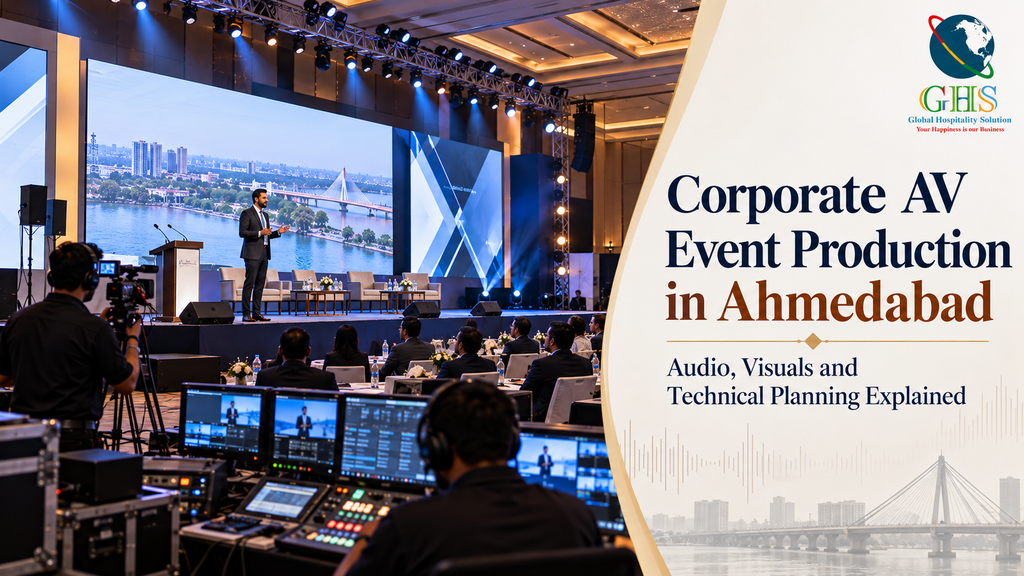
Corporate AV production refers to the planning, installation, operation and coordination of the technical systems used during an event. These systems typically include microphones, loudspeakers, mixing consoles, presentation screens, projectors, LED displays, lighting fixtures, playback systems and associated signal connections.
The specific configuration depends on the event format. A small boardroom meeting may need a conference microphone system and a display connected to a laptop. A large corporate conference may require multiple microphones, stage monitors, presentation computers, LED screens, lighting control and dedicated technical operators.
Product launches introduce additional requirements, such as synchronised video playback, reveal sequences, product demonstration lighting and coordinated stage cues. Hybrid events require further integration with cameras, streaming platforms, remote presenters and online audience audio.
The central objective is to create a technical environment in which speakers can communicate clearly, visual information remains accessible and programme transitions happen without unnecessary delays.
Audio Planning: Creating Clear and Consistent Sound
Sound quality has a direct influence on how effectively an audience receives information. If speech is difficult to understand, attendees may miss important details even when the presentation itself is well prepared.
Audio planning begins with the venue’s dimensions, seating configuration, ceiling height, acoustic characteristics and expected audience size. A system suitable for a small meeting room may not provide adequate coverage in a large conference hall.
Selecting the Right Microphones
Different microphones serve different purposes. Wireless handheld microphones are useful for keynote presentations, audience questions and interactive sessions. Lavalier microphones allow presenters to move freely while speaking, while headset microphones can provide consistent microphone positioning for speakers who move frequently across a stage.
Gooseneck microphones are often appropriate for panel discussions or fixed conference tables. In larger events, microphone requirements should be mapped to the programme so that speakers, moderators and audience participants can communicate without delays.
Battery condition, radio-frequency coordination and spare equipment should be checked before the event begins. Wireless systems must also be tested in the actual venue because interference and signal conditions can vary between locations.
Speaker Placement and Acoustic Coverage
Loudspeaker placement should provide reasonably consistent sound throughout the audience area. Speakers positioned incorrectly can create uneven coverage, excessive volume near the front or weak speech intelligibility at the rear.
Room geometry, reflective surfaces and stage position affect how sound travels. Hard walls, glass surfaces and high ceilings may increase reflections, making speech harder to understand. Appropriate speaker placement, system tuning and sound checks can reduce these problems.
Audio feedback occurs when sound from a loudspeaker re-enters a microphone and is amplified repeatedly. Microphone positioning, loudspeaker direction, gain settings and equalisation all contribute to feedback control. These checks are especially important during panel discussions, where several microphones may be active simultaneously.
Visual Systems: Screens, Projectors and LED Displays
Visual systems help audiences follow presentations, view demonstrations and understand complex information. The appropriate display technology depends on the room, ambient light, viewing distance, content and event budget.
Choosing Between Projectors and LED Screens
Projectors can be suitable for controlled-light conference rooms and presentations where large projected images are required. Their performance depends on factors such as brightness, projection distance, screen surface and ambient lighting.
LED displays can offer high brightness and flexible screen configurations, making them useful for larger halls, product launches and stages with substantial visual content. However, pixel pitch, viewing distance, screen dimensions, content resolution and power requirements must be considered before selecting a display.
A screen that looks impressive from the control desk may not provide the same experience for attendees seated near the sides or at the back of the venue. Viewing angles and text size should therefore be assessed from representative audience positions.
Presentation slides should also be designed for the actual display environment. Small fonts, crowded layouts and low-contrast graphics reduce readability, particularly in large rooms. Important information should remain legible without requiring attendees to interpret dense paragraphs on a screen.
Stage Lighting and Visual Presentation
Lighting serves both functional and visual purposes. It allows the audience to see speakers clearly, supports video recording and establishes the appropriate atmosphere for different sections of the programme.
Front lighting is important for presenter visibility, while carefully positioned stage lighting can separate the speaker from the background. Decorative lighting may support branding or stage design, but it should not compromise facial visibility or make presentation screens difficult to view.
Colour temperature, brightness, fixture placement and spill control should be considered together. Excessive brightness can wash out projected content, while poorly positioned fixtures may create glare for speakers or audience members.
Lighting cues can also support transitions between keynote sessions, panel discussions, product demonstrations and award presentations. These cues should be programmed and rehearsed rather than operated entirely through improvisation.
Technical Planning Before the Event
Technical planning should begin well before equipment installation. The production team needs to understand the event agenda, venue layout, speaker requirements, presentation formats and expected audience experience.
A technical site inspection helps identify power outlets, equipment access routes, ceiling rigging options, loading areas, control-room positions and possible cable-routing challenges. It also provides an opportunity to assess acoustics, lighting conditions and display visibility.
The technical plan should document equipment quantities, system connections, operator responsibilities, installation schedules and testing requirements. A clear equipment list reduces the risk of missing adapters, cables, power distribution equipment or essential accessories.
Power planning deserves particular attention. Audio systems, lighting equipment, LED screens and computers may require separate circuits or carefully managed distribution. The venue’s available electrical capacity should be verified rather than assumed. Cable routing should also avoid obstructing walkways and emergency exits.
GHS provides corporate event production and AV solutions that cover technical requirements such as audio, visual systems, stage production, lighting and event support.
Managing Presentation Content and Signal Flow
Even when equipment is functioning correctly, technical issues can occur because of incompatible files, unsupported video formats, incorrect display settings or poorly organised signal connections.
Presentation files should be collected and checked in advance. Fonts, embedded videos, animations, aspect ratios and audio playback should be tested on the computers that will be used during the event.
For conferences involving multiple speakers, a central presentation system can reduce delays caused by connecting and disconnecting individual laptops. The production team should also maintain a clear file-naming system and confirm the order of presentations with the event coordinator.
Signal flow describes how audio and visual information travels from its source to the audience. A typical visual chain may include a presentation computer, a video switcher or distribution system, a processor and the final display. Audio may travel from microphones through a mixing console and processing equipment to loudspeakers.
Understanding these connections helps technicians identify faults more quickly. Labelling cables, documenting connections and keeping spare adapters available can reduce troubleshooting time during the programme.
Hybrid Events, Recording and Live Streaming
Hybrid corporate events combine in-person participation with remote attendance. They require additional planning because the online audience must receive clear audio, stable video and appropriate access to presentation material.
A basic streaming setup may include cameras, audio feeds, capture or switching equipment, a streaming computer and a reliable internet connection. Larger productions may require multiple camera angles, graphics, remote-speaker integration and dedicated stream monitoring.
Audio routing is particularly important. Remote attendees need to hear presenters and audience questions, while speakers in the venue may need to hear remote participants through a controlled return-audio system. Poor routing can create echo, feedback or situations in which one audience cannot hear the other.
Internet connectivity should be tested under realistic conditions. A dedicated connection, where available, may provide greater predictability than relying entirely on shared venue Wi-Fi. Backup connectivity and local recording can also help protect the event against certain technical failures.
Recording requirements should be confirmed in advance, including camera positions, storage, file formats, permissions and the intended use of the final material.
Technical Rehearsals and Contingency Planning
A technical rehearsal allows the production team to test equipment and programme transitions before attendees arrive. It should cover microphone checks, presentation playback, lighting cues, video transitions, stage movement and any live-streaming requirements.
Rehearsals are particularly important for product launches and scripted corporate programmes, where several technical elements may need to occur in a precise sequence.
Contingency planning should focus on realistic failure points. Spare microphones, batteries, adapters and essential cables can help resolve common equipment problems. Backup presentation files and an alternative playback device can reduce the impact of computer-related failures.
The team should also establish clear escalation procedures. The event manager, stage manager and technical lead need to know who can authorise changes and how unexpected delays should be communicated to speakers.
A backup plan does not eliminate every risk, but it reduces the likelihood that a minor technical problem will interrupt the entire event.
Coordinating AV Production With Venue and Event Management
Technical production cannot operate independently of the wider event plan. Stage dimensions influence seating and sightlines, lighting positions affect venue aesthetics, and equipment installation schedules influence when decorators and other suppliers can access the space.
The event agenda should be shared with the technical team so that equipment changes and programme transitions can be planned in advance. A panel discussion may require a different microphone configuration from a keynote session, while a product demonstration may need dedicated lighting and a specific display connection.
Venue restrictions also need to be confirmed early. Some locations impose limits on rigging, electrical connections, equipment installation times or the use of special effects. These restrictions may affect the design and budget if they are discovered late in the planning process.
Integrated planning reduces duplication, avoids conflicting supplier activities and allows technical requirements to be considered alongside the attendee experience.
Budgeting for Corporate AV Production
AV budgets vary according to event size, duration, technical complexity and venue requirements. Major cost components may include equipment rental, transport, installation, dismantling, technical operators, stage construction, cabling, power distribution and rehearsals.
The cheapest equipment package is not always the most economical choice. An undersized sound system, insufficient screen capacity or inadequate technical staffing may lead to additional rental charges or operational problems later.
A practical budget should distinguish essential technical requirements from optional enhancements. For example, a small internal meeting may not need elaborate stage lighting, while a product launch with multiple presentation cues may justify a more advanced production setup.
Equipment availability, installation windows and overtime requirements can also affect cost. Obtaining a clear production scope and confirming inclusions before approval helps businesses compare proposals more accurately.
Conclusion
Corporate AV event production combines technical expertise with detailed planning and coordination. Audio clarity, display visibility, stage lighting, signal management, rehearsals and contingency arrangements all contribute to a reliable event environment.
For businesses organising conferences, seminars, product launches and corporate meetings in Ahmedabad, technical decisions should be based on the venue, audience, programme format and communication objectives. Equipment selection alone is not enough; every system must work together within a carefully prepared operational plan.
When AV production is integrated with venue planning and event management, technical systems become an effective means of communication rather than a potential source of disruption. The result is a more professional experience for presenters, delegates and organisers.
Frequently Asked Questions
What does corporate AV event production include?
Corporate AV production can include microphones, sound systems, projectors, LED screens, stage lighting, presentation equipment, video playback, signal distribution, technical operators and live-streaming systems, depending on the event requirements.
How early should AV production be planned?
Planning should begin during the initial event-design stage, particularly when the programme requires stage construction, complex displays, multiple sessions or hybrid participation. Site inspections and technical rehearsals should be scheduled before the event.
What is the difference between a projector and an LED screen?
Projectors display images by directing light onto a projection surface, while LED screens use light-emitting diodes to create images directly. The appropriate option depends on ambient lighting, viewing distance, screen size, content and budget.
Why is a technical rehearsal important?
A rehearsal allows the production team to test sound, displays, lighting cues, presentation files and programme transitions. It also helps identify equipment or workflow problems before the audience arrives.
Is AV production necessary for small corporate meetings?
Small meetings may need only a display, a suitable microphone or conference-audio system and reliable connectivity. The technical setup should reflect the room size, number of participants and communication requirements rather than automatically using a large-event configuration.
:::